.png)
Lume is a MIDI-based audio visualizer that renders graphics in real time! It’s primary purpose is to create visuals for (my) music videos— adding some eye candy by showing what notes are currently being played.
I’ve actually been using Lume for a few months now, and it’s in a good enough state for me to use as one my own creative tools. If you aren’t familiar with it, here’s a video of my first official release using Lume:
Obviously the Minecraft footage is not a part of it, but the "overlay" plus "framing" is— the keyboard, analysis text (i.e. "Em7/G" and "G, D, and E" from the thumbnail), and the real-time information at the top left.
Plus, y’know— the border, but that isn’t as interesting.
origins
Audio visualization is a nice thing I like to have as part of my music. Whenever I post a song on YouTube, I’ll usually slap a spectrum visualizer so viewers (including me) have something to see while people listen. I think the most prominent example are those EDM YouTube promoters/publishers, like Proximity and Monstercat.
Lume is a project that was inspired by a few things, but the root of it was from a tweet from a music producer named symmez.
p5.jsの練習でコードの視覚化をしました pic.twitter.com/6vt8K7bOIr
— 新目鳥 (@Symmez) November 9, 2024
He had posted a little behind-the-scenes of one of his visualizers, where half of the screen had the code used to powered it. In a reply, he mentioned that he used p5.js, a JavaScript graphics library.
I thought it was pretty cool, and I’ve always wanted to work on a JavaScript[1] project that wasn’t strictly front-end, so I tried to make something based off of it— with my own flair, of course. I rarely deal with graphics (apart from making my own sprites in my games), but p5.js makes heavy emphasis on it’s ease of use and focus on creating art over acting as a standard library, so it felt like a forgiving thing to try.
Plus, it’s making art by coding, so I thought it would make more sense for my programming-oriented brain.
midi?
I should note that the wording of "MIDI-based audio visualizer" kinda makes no sense, because if it’s powered through MIDI, it’s not being powered through audio. It’s mostly just a quick one-liner to explain what Lume does without having to get into detail.
Unless I’m writing a blog post, then I probably should.
(If you have no idea what MIDI is, you can think of as "computer sheet music." Sheet music doesn’t produce a sound, but it acts as instructions on how to play a song.)
The reason for creating Lume this way is that the notes themselves are the most important piece of data for me. The whole project was inspired by a visualizer that provided detailed information on the notes being played— their positions on the scale, how long they lasted, and the relationships between them. This is in contrast to audio visualizers, which usually come in the form of displaying a waveform (the "shape" that is produced/being repeated by your computer to make the sound you’re hearing at the moment) or spectrum (showing sound activity based on frequency, high pitches and low pitches).
how does it all work?
Lume isn’t the most complex application, but it’s definitely more complex than a basic website— for all practical purposes, it is not a website, even though it runs on a browser.
For a somewhat long, but relatively non-technical explanation on how Lume works (at the time of writing):
At the heart of Lume’s rendering is something internally known as a graphic— a collection of code that knows how to draw one specific thing. This "thing" can be as simple as a box, or as complex as a piano keyboard. Graphics are given real time information when Lume is running (what notes are active, how long has this file been playing for, etc).
A layout is a collection of graphics, and is what the user sees when running Lume. Before Lume can begin rendering, a layout must be chosen. Users can choose from a selection of layouts that I’ve made. There is some customization, but it is very limited, and mainly just colors.
When the rendering engine is turning on, Lume loads up the file you want to play, and sets up the page for playback by creating all the necessary graphics. It will customize the style and format of these graphics based on chosen layout (e.g. make the keyboard big, have diamonds in the background behind the keyboard).
While Lume is playing back a file, you can imagine these steps happening every frame:
-
The MIDI player informs Lume on any note changes.
-
Lume processes the data, and converts it into a format that graphics can use.
-
The screen is reset.
-
Each graphic is told to draw themselves, one at a time. Graphics will read the current state of the MIDI playback and update accordingly.
-
The user sees the new frame.
TL;DR: This is too complicated.
Okay. How about a picture?
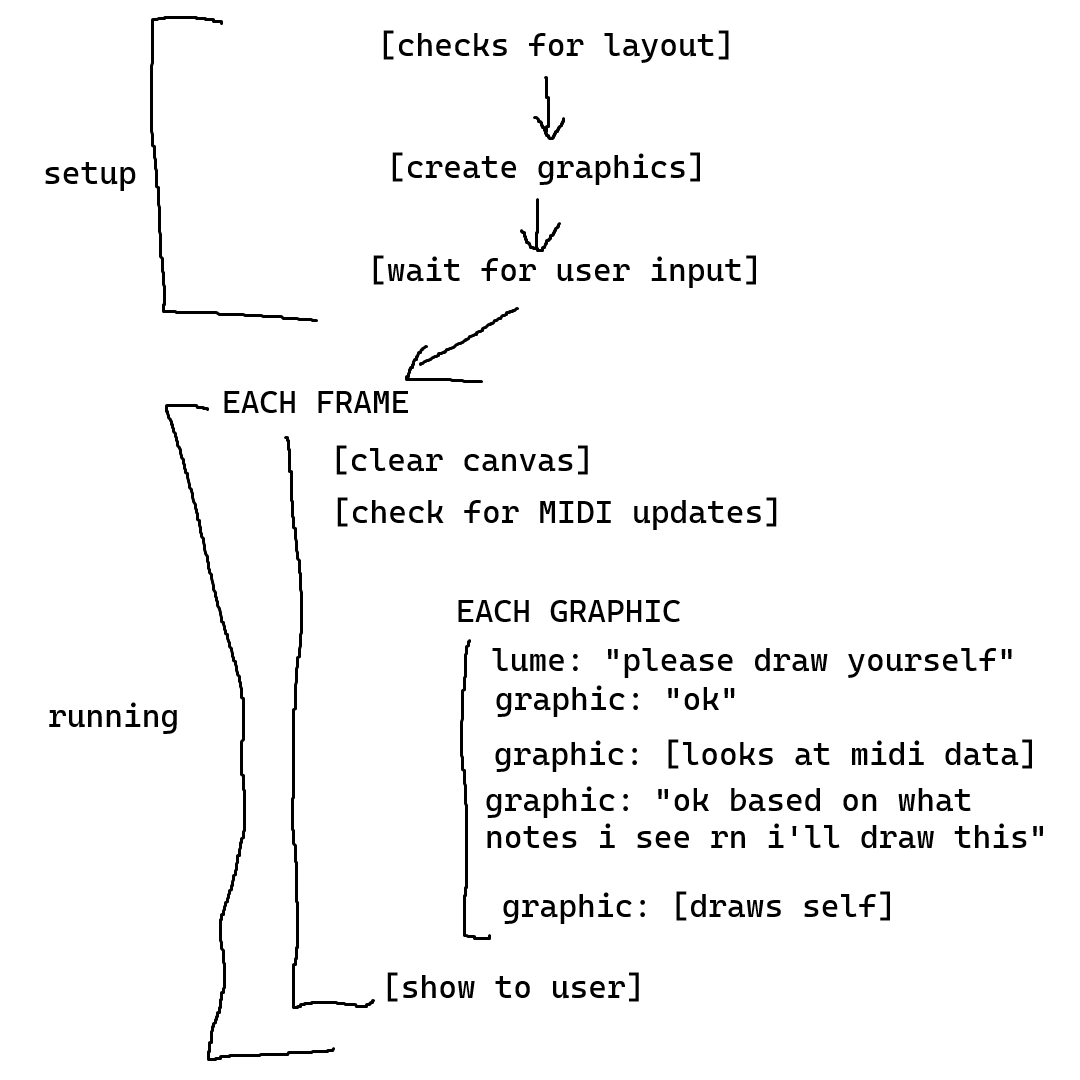
Q: that gives less information
A: ok what if i remake it in the style of a text app fanfiction:
Q: what?
A:
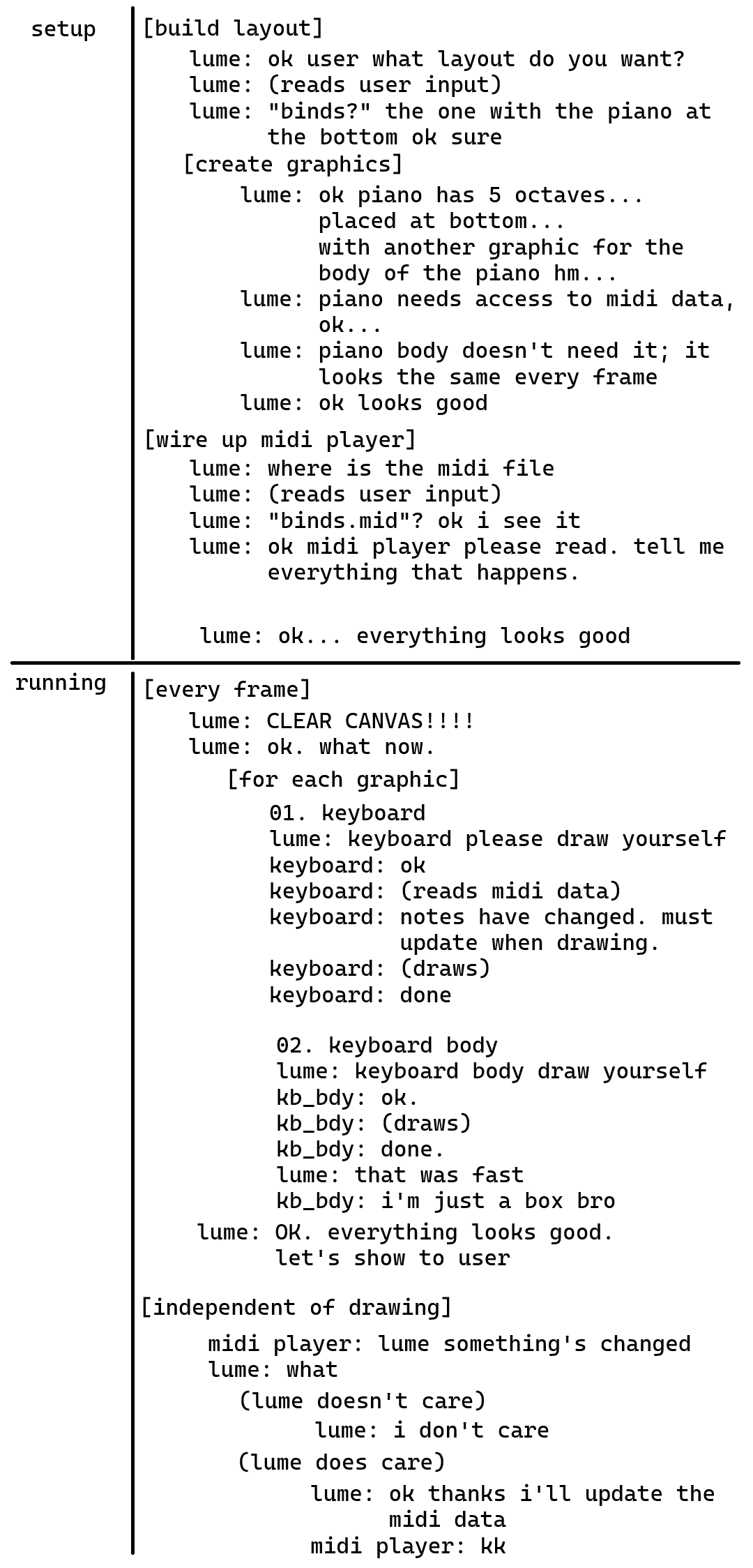
Q:
A: yeah.
plans
Lume was only ever intended to be a project for personal use, but as I’ve spent more time developing it, it’s clear that it’s probably the most enjoyable out of my long term projects. The creation of new visualizers and layouts is an interesting technical challenge I haven’t gotten anywhere else. In the future, the end goal is for Lume to be a standalone desktop application that can be used by everyone.
I’ve actually been working on that but unfortunately I’ve rediscovered how painful front-end development is. I don’t normally like to upload posts on projects that I haven’t uploaded, but Lume keeps growing in scope and it’s already being used, so it feels wrong to not write about it.
I probably won’t immediately release Lume once I get the app up and running— despite my regular work on it, there are very little layouts that aren’t just "a keyboard with other stuff" (to be honest, I’m trying to squeeze as much milage out of it as possible— it was a pain to make). I have some plans to do something akin to a guitar/bass neck, but I’m a long ways from realizing that.
We’ll see.
(Well, you’ll see— hopefully.)
footnotes
I swapped to TypeScript after two days of progress. I was working on a function that needed numerical inputs and I was like "do I have to verify the types for everything now? i wish javascript had types" ↩︎